.png)
%20Large.jpeg)
How Caliber Works: A Clean, Modern Recruiting Workflow
.png)
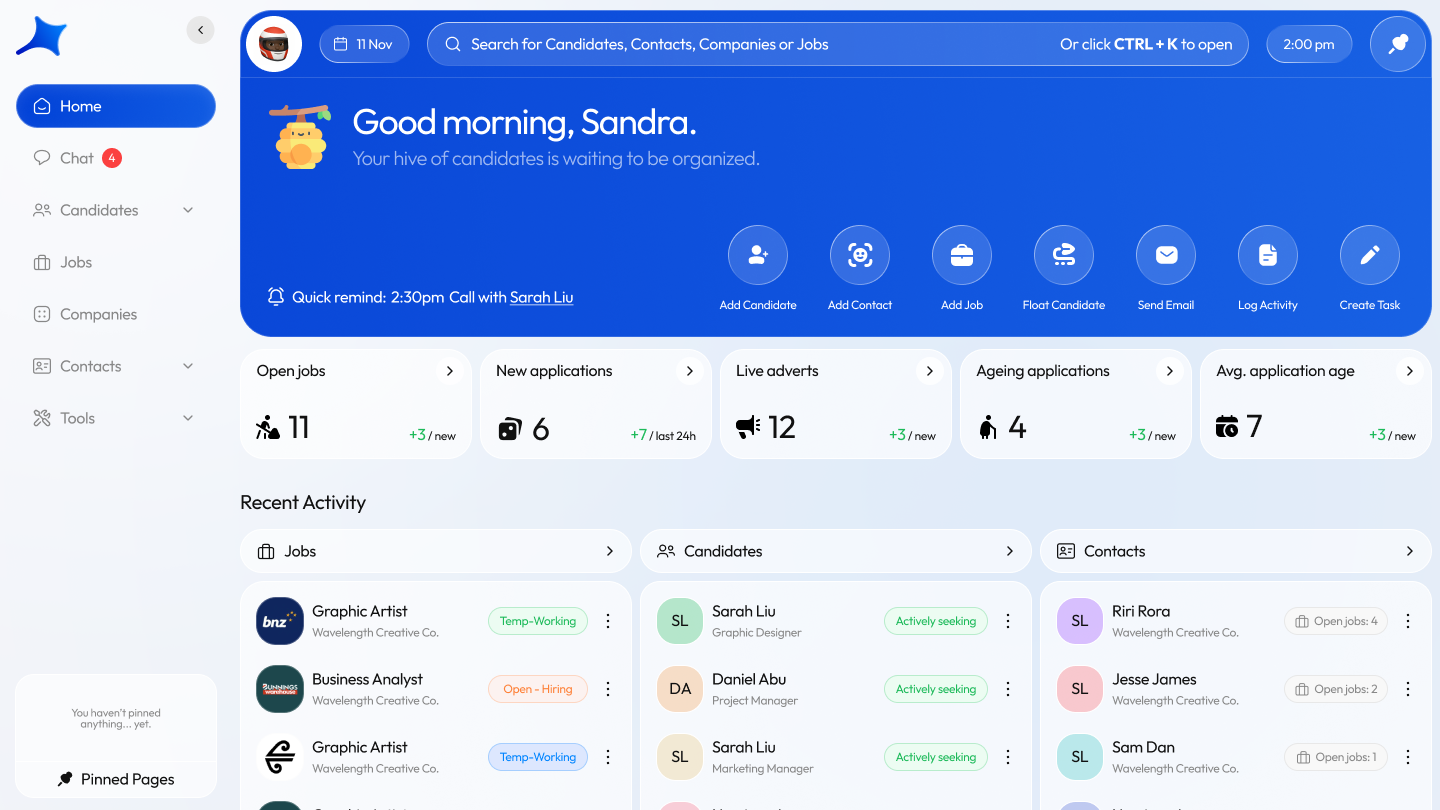
Your command center for the whole desk
Most ATS home pages are either a blank desert or a dashboard trying way too hard. Caliber takes the middle ground. It gives you exactly what you need to run your day, without drowning you in charts that only look good in sales demos.
When you start your day, you land in a layout that actually helps you work. You see your open jobs, new applications, ageing applications and recent activity across candidates, jobs and contacts. It's clean, calm and built for recruiters who don't want their tools shouting at them.
At the top, you’ll notice three things that instantly make Caliber feel different.
1. Global search for candidates, companies, contacts and jobs
Type a few letters and jump straight to any candidate, company, job or contact. No clicking down rabbit holes. No “where did they hide that field again”. It’s the one thing recruiters hit all day because it’s quicker than thinking.
2. Quick actions for the seven things you do constantly
Across the top of the home screen you have one-tap actions for:
- Add candidate
- Add contact
- Add job
- Float candidate
- Send email
- Log activity
- Create task
All right there. No digging through menus. No guessing games. It’s almost unsettling the first time you use it because everything’s exactly where your brain expects it to be, removing the “where do I click for this again” feeling that legacy systems create.
3. Pin pages instead of opening twenty shrinking browser tabs
Recruiters have a special talent for turning one ATS into twelve browser tabs. Caliber fixes that by letting you pin important pages inside the app. Need that job open all day? Pin it. Need your talent pool always visible? Pin it. You still move fast, but you don’t lose track of anything.
The result is a home base that keeps your desk moving without feeling like clutter.
Working candidates feels simple, clean and surprisingly calm
Candidate profiles in older ATSs feel like spreadsheets wearing a costume. Caliber gives you something that’s actually pleasant to work from.
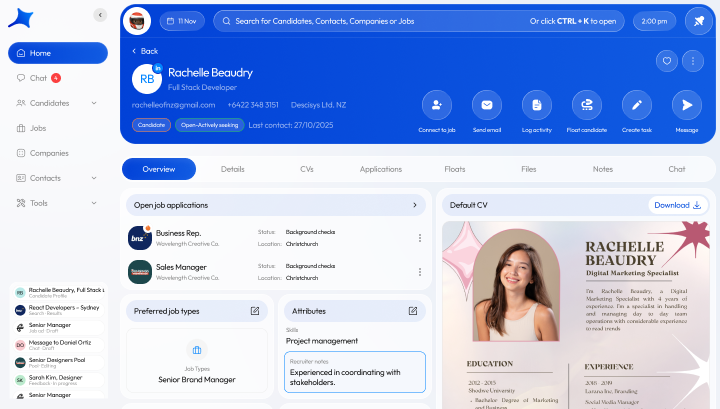
When you open a candidate, the header tells you everything at a glance. Contact info, status, availability, location, last contact, quick buttons to message them or connect them to a job. No hunting. No clicking through four tabs to find the obvious.
A layout that shows what matters
Below the header, Caliber organizes information into panels that make sense:
- open applications and their status
- preferred job types
- skills and attributes
- CVs right next to structured data
- floats, history and notes
Everything’s visible. Nothing’s buried. You don’t feel like you need a manual to understand the page.
Communication that behaves like a conversation
Caliber Chat pulls your email into a clean chat-style inbox. It feels familiar and removes the “scroll through twenty email chains” problem recruiters deal with every day. When you look at a candidate, you’ll see messages, notes, tasks and activity together, which means you always know where you left things.
Automation that handles the admin you never want to think about
You get:
- AI profile creation
- AI CV parsing
- reusable email templates
- interview and reference templates
Caliber quietly fills the admin gaps so you can actually recruit.
Power functions for the busy days
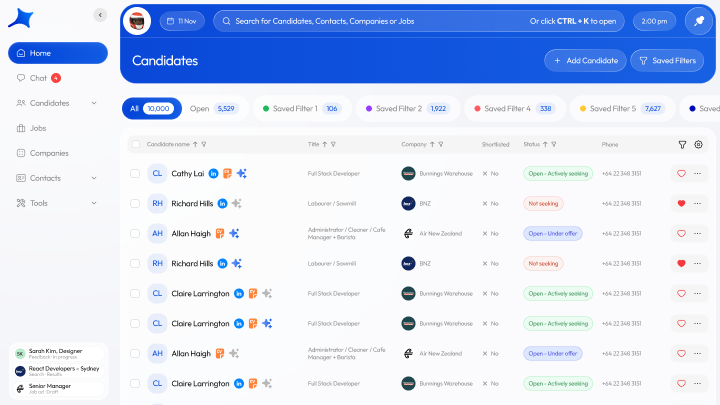
From the candidates list, you can use saved filters, build talent pools, send bulk emails and update statuses in one shot. Saved filters mean you never rebuild the same search twice. They’re always there waiting for you.
Nothing flashy, nothing gimmicky, just practical speed.
Your jobs, clients and contacts finally live in one clean system
Recruiters are half salesperson, half project manager, half therapist. An ATS should support that, not split it into different corners of the software.
Caliber blends ATS and CRM into one flow so you can work your whole desk without switching tools.
A CRM that doesn’t feel like a separate product
Every company and contact shows:
- roles you’ve worked on
- submissions and floats
- notes and call logs
- email threads
- next steps and follow ups
- hiring preferences
- warm opportunities
It’s everything you need to understand the relationship without exporting anything to a spreadsheet “just in case”.
Follow ups with context, not chaos
Tasks sit exactly where they belong, right next to the related conversation or submission. No floating reminders. No disconnected to-do list. You open a record and instantly know what the next move is.
Tools that keep the whole desk moving
You get:
- integrated job board posting
- careers site applications flowing straight into the ATS
- a recruiter mobile app for work on the go
- talent pools and targeted marketing lists
- mass emailing that looks clean and professional
It feels like modern software built for the pace recruiters actually move at.
Core sales activity that takes seconds
Logging BD calls, catch ups or client activity is quick and doesn’t break your flow. Directors can see what’s happening without chasing people for updates, which saves everyone time and sanity.
What’s coming next
Sourcing from a large external dataset is coming soon. When it arrives, you’ll be able to search, preview and add candidates into Caliber without leaving the platform. No tabs. No plugins. No clutter.
The goal stays the same. Keep the workflow clean. Keep the interface intuitive. Give recruiters software they don’t have to fight with.